Elevate Your Pitch: The Video Production Google Slides Template
In the fast-paced world of media and broadcasting, your presentation is often your first handshake with a potential client or investor. If you are a videographer, content creator, or run a multimedia studio, you know that visual storytelling is everything. You wouldn't shoot a film with a low-quality camera, so why present your business plan using a generic, cluttered slide deck? Enter the Video Production Google Slides Template—a tool designed to bridge the gap between your creative vision and professional business communication. This isn't just a collection of slides; it is a curated environment built for the specific needs of the film and video industry.
The Power of Minimalist Visual Hierarchy
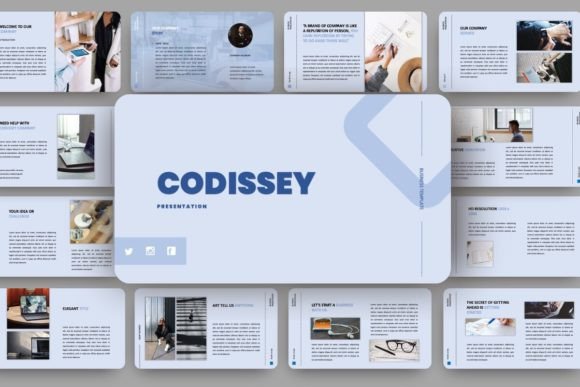
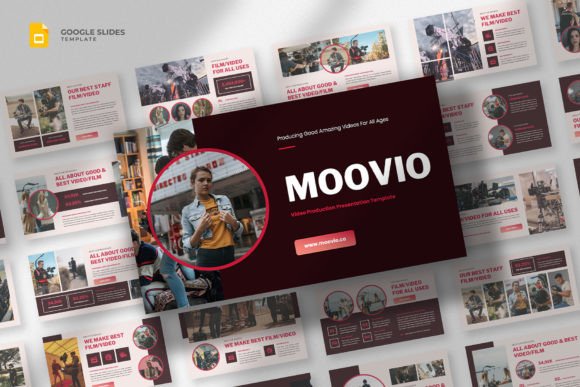
The most striking characteristic of this template is its commitment to a simple, clean, minimalist, and modern aesthetic. In editorial design and web design, white space is a powerful asset, and this template uses it effectively. Unlike cluttered templates that scream for attention with unnecessary graphics, this layout allows your content to breathe. The visual personality here is confident and authoritative. It doesn't rely on gimmicks; instead, it uses modern typography to establish a clear hierarchy.
When you open the file, you will notice that the text placement is intentional. Headlines are bold and commanding, utilizing a sans serif font style that implies clarity and technical precision—qualities highly valued in video production. The body text is spaced generously to ensure readability, even when displayed on a projector screen in a large conference room. This design approach ensures that your audience focuses on your message—whether it's a storyboard, a budget breakdown, or a company profile—rather than getting distracted by visual noise.
Practical Applications: From Studio to Boardroom
One of the strongest aspects of the Video Production Google Slides Template is its versatility. It functions as a true multipurpose business presentation template, meaning you don't need to buy different assets for different stages of your business. Here is how you can practically apply it across various scenarios:
- The Startup Pitch Deck: If you are seeking funding for a film or a new media app, this template provides the structure needed to tell a compelling story. You can map out your market strategy and monetization plans without the design looking amateurish.
- Company Profile & Marketing Kit: For established video production studios, consistency is key to brand identity. Use this template to create a standardized "About Us" deck. Because it is resizable and editable, you can easily swap out color palettes to match your specific brand guidelines, turning a generic template into a bespoke design asset.
- Client Pitches: Content creators and influencers often need to pitch collaboration ideas to brands. This template's professional layout elevates your proposal, making your rates and deliverables look justified and premium.
- Educational Workshops: If you teach cinematography or video editing, the clean layout ensures that your educational text is legible and easy to follow.
Design Psychology and Brand Perception
Never underestimate the psychology of presentation design. The tools you present with say as much about you as the words you use. When you use a template that features 100% free fonts and a 16:9 wide screen layout, you are signaling that you understand current industry standards. A 4:3 aspect ratio can look dated, but the widescreen format mimics the cinematic aspect ratios your audience is used to seeing on their screens.
Furthermore, the minimalist style influences audience engagement. Cognitive load theory suggests that if a slide is too busy, the audience tunes out. By using this template, you are reducing that cognitive load. The clean lines act as a frame for your content, much like a matte box frames a lens. It helps build trust. A potential client viewing a polished deck is more likely to believe you can handle their multimedia project with the same level of care and professionalism.
Customization and Workflow Efficiency
For the busy entrepreneur or designer, time is money. The fact that this is a Google Slides file (also available as .PPTX) is a massive workflow advantage. It allows for real-time collaboration. Your team can edit the slides simultaneously, whether you are in the studio or working remotely.
Here are a few tips for getting the most out of this template:
- Evaluate the Graphics: The package includes resizable and editable graphics. Instead of keeping the placeholder icons, look for vector graphics that match your specific niche. If you are a cinematographer, swap generic icons for camera lens graphics. If you are a broadcaster, use signal or satellite icons.
- Font Pairing: While the template comes with suggested fonts, feel free to experiment with font pairing. Since the layout is minimal, it can handle a distinct display font for headers to give it more personality, paired with a highly legible body font.
- Visual Consistency: Use the slide master feature in Google Slides to lock in your preferred fonts and colors. This ensures that if you delegate the presentation creation to an assistant, they cannot accidentally break the brand consistency.
Final Verdict: A Professional Standard
The Video Production Google Slides Template is more than just a set of slides; it is a foundation for professional communication. In an industry saturated with visual content, standing out requires a balance of creativity and polish. This template provides the polish, allowing you to focus entirely on the creativity. Whether you are pitching a blockbuster script, presenting a marketing strategy, or outlining a broadcast schedule, this modern and professional template ensures your ideas are delivered with the clarity and impact they deserve.
Remember, the best presentations are those that support the speaker without overpowering them. With its minimalist design and focus on readability, this template hits that sweet spot perfectly. It is an essential addition to any creative professional's digital toolkit.