Elevate Your Brand Story with the Haora Creative Presentation Template
Creating a presentation that truly connects with your audience goes far beyond just arranging slides. It’s about crafting a narrative, establishing a mood, and building a visual language that people remember. Many professionals find themselves stuck choosing between rigid, corporate templates and overly playful designs that lack polish. This is where the Haora Creative Presentation Template steps in. It bridges that gap, offering a sophisticated yet adaptable foundation for anyone looking to present ideas with clarity and style. Whether you are pitching a new business concept or showcasing a design portfolio, the visual consistency of your materials is your first handshake with the audience.
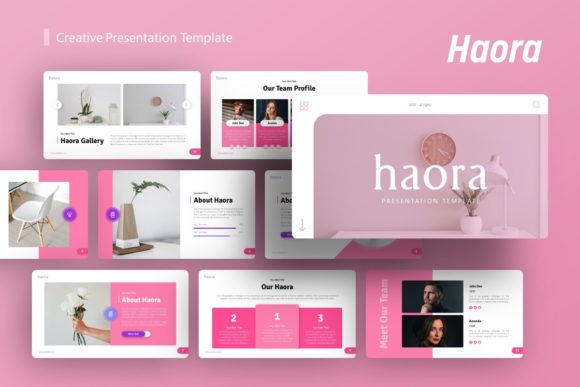
The Haora template isn't just a collection of slides; it’s a complete design ecosystem. When you open the file, you immediately notice the attention to detail. The layout feels balanced, breathing with ample white space, yet it doesn't feel empty. This is the hallmark of modern typography and layout design—knowing that what you leave out is just as important as what you include. The structure guides the viewer's eye naturally from the headline to the supporting content, ensuring that your message isn't lost in visual noise.
A Deep Dive into Visual Personality and Versatility
One of the standout qualities of the Haora Creative Presentation Template is its inherent versatility. In the world of design assets, we often look for that "unicorn" file that works for multiple scenarios. Haora fits this description well. Its visual personality is clean, professional, and contemporary, making it an excellent choice for a Creative Agency looking to impress a client, or a startup trying to secure investor funding.
The template relies on a master slide structure, which is crucial for maintaining brand identity. Instead of manually adjusting fonts and colors on every single page, you can set your brand guidelines once and watch them apply across the entire deck. This is a massive time-saver, but more importantly, it ensures consistency. Consistency builds trust. When a potential client sees that every slide aligns perfectly with the last, they perceive the presenter as organized and detail-oriented.
Practical Applications for Real-World Projects
Let’s talk about how you can actually use this in your day-to-day work. If you are a photographer, you know that your images need to be the star of the show. Haora includes picture placeholders that allow for easy drag-and-drop integration. You don’t need to be a PowerPoint wizard to make your photos look high-end. The pixel-perfect illustrations and handcrafted infographics provide context without overshadowing your primary content.
For marketers and content creators, the Haora Creative Presentation Template serves as a robust backbone for social media graphics and web design proposals. Imagine walking a client through a new packaging design or an editorial design layout. Instead of sending static PDFs, you can present an interactive experience that feels dynamic. The template includes 36 distinct slides, giving you a massive library of layouts to choose from. You can mix and match sections to fit the specific flow of your story.
Maximizing Impact with Infographics and Hierarchy
Visual hierarchy is the silent guide of any good presentation. It tells the viewer where to look first, second, and third. The Haora Creative Presentation Template excels here through its use of bold headers and structured content blocks. The included infographics are particularly valuable. Data visualization can often be the weakest link in a presentation, looking cluttered or confusing. However, the graphics in Haora are designed to be resizable and editable, meaning you can adapt them to fit complex datasets without sacrificing aesthetics.
Consider the portfolio use case. A graphic designer or small business owner often needs to showcase a range of work, from logo design to full-scale campaigns. The modular nature of the slides allows you to create case studies that flow logically. You can dedicate a full slide to a visual hero shot, followed by a breakdown of the strategy. This approach respects the viewer's intelligence and keeps them engaged through the presentation.
Customization and Workflow Efficiency
A template is only as good as its ability to be customized. If a file is too locked down, it stifles creativity; if it’s too open, it becomes difficult to manage. Haora strikes the right balance. Because it is based on Master Slides, making global changes is effortless. Need to change the accent color to match a client’s specific brand hex code? A few clicks and you are done.
Furthermore, the inclusion of vector icons is a significant advantage. Unlike raster images, vectors can be scaled to any size without losing quality. This means your presentation will look crisp and professional whether it’s displayed on a laptop screen or projected onto a massive wall in a boardroom. This level of polish is what separates amateur efforts from professional-grade work.
Choosing the Right Design Assets for Your Brand
When evaluating whether the Haora Creative Presentation Template is right for you, think about the impression you want to make. If your brand identity leans towards the modern, clean, and sophisticated side, this template will feel like a natural extension of your voice. It avoids the trap of being too trendy, which can quickly look dated, opting instead for a timeless aesthetic.
It is also worth noting the practical aspects of the file. The documentation included helps you navigate the features, and the PowerPoint .PPTX format ensures compatibility with the most widely used software in the business world. While the demo images are for preview purposes, the placeholders make it incredibly simple to insert your own high-resolution content. By investing in high-quality design assets like this, you are not just buying a file; you are investing in your professional reputation. It streamlines your workflow, elevates your visual storytelling, and ultimately helps you communicate your value more effectively.